
On October 22, 2026, Canva did something it had never done before: it launched an AI image model it built entirely on its own. The new model, called Canva Craft, is now live inside Canva’s Dream Lab for every user and available to developers through Canva’s public API. For a company that has spent years renting other people’s image models, this is a turning point — Canva is no longer just a design app sitting on top of someone else’s AI. It is now an AI lab in its own right, and it says so proudly, claiming the number-two spot on the public DesignArena leaderboard behind OpenAI.
But the headline is not the only thing that matters here. Canva Craft works differently from nearly every mainstream image generator. Instead of turning your words straight into pixels, it splits the job in two: a planning model reads your prompt and drafts the layout first — deciding where each element sits, how big it is, and what text must appear — and only then does a second rendering model paint the picture. Canva says this “plan before draw” approach fixes the two things AI images have always been worst at: readable text and objects landing where you asked them to.
In this guide, I break down everything we know so far about Canva Craft: how the technology works, what it can and cannot do, how much it costs, how it stacks up against rivals like OpenAI’s image models, Ideogram, and Meta’s Muse Image, and whether it is worth using for your design work right now. I have checked the launch reporting from multiple outlets, so you get the facts — with honest caveats where Canva’s own claims have not yet been independently verified.
Table of Contents
- What Is Canva Craft?
- How Canva Craft Works: The “Plan Before Draw” System
- Key Features of Canva Craft
- The DesignArena Claim: How Good Is It Really?
- Canva Craft vs the Competition
- Pricing: How Much Does Canva Craft Cost?
- How to Use Canva Craft in Dream Lab
- Who Is Canva Craft Best For?
- Limitations and Honest Caveats
- Why Canva Built Its Own Model
- Frequently Asked Questions
- Final Verdict
What Is Canva Craft?
Canva Craft is Canva’s first proprietary text-to-image model — the first image generation model the company has designed and trained in-house rather than licensing from a third party. It was developed by Canva Research, the company’s internal AI lab, which draws together more than 160 AI researchers and engineers from teams at Leonardo.ai and Kaleido, two startups Canva acquired. According to the launch reporting, researchers from Leonardo — the Sydney-based image startup Canva bought in 2024 — worked directly on Craft.

Until now, Canva’s AI image features leaned on other companies’ models. When Canva launched Dream Lab, its AI image space, in October 2024, it ran on Phoenix, the image model from Leonardo.ai. Craft replaces that dependency with a model Canva owns outright — one trained, tellingly, not on photographs scraped from the web but on millions of human-made design templates from Canva’s own library: posters, social posts, presentations, menus, infographics, and typography-heavy layouts. That training-data choice is the single biggest clue to what Canva Craft is for. It is not trying to be the best camera. It is trying to be the best designer’s assistant.
At launch, Craft is available to all Canva users from the Dream Lab tab, and developers can call it through Canva’s public API. Canva has also announced lighter and faster siblings — Craft-fast and Craft-ultrafast — coming soon, and says image generation inside third-party chatbots like ChatGPT and Google’s Gemini will arrive via its MCP (Model Context Protocol) server. In other words, this is day one of a model family, not a one-off feature drop.
How Canva Craft Works: The “Plan Before Draw” System
The most interesting thing about Canva Craft is its architecture. Almost every popular image model today — from Midjourney to DALL-E to open-weights options like the FLUX family — works as a single pipeline: words go in, pixels come out. Craft deliberately breaks that pattern into two stages.
Stage one: the planner
When you type a prompt, a planning model reads it and writes out a detailed layout plan before anything is drawn. That plan spells out the composition: which elements appear in the image, where each one sits in relation to the others, their relative sizes and scale, which elements matter most in the visual hierarchy, and — critically — what text needs to appear, in which language and in what position.
If you think of a traditional image model as someone who starts painting the moment you finish your sentence, Craft is the colleague who first sketches a thumbnail, checks the brief against it, and only then commits. That extra beat is where the model’s advertised strengths come from.
Stage two: the renderer
A separate rendering model then takes the finished plan and generates the final picture at up to 2K resolution, in more than 30 aspect ratios or a custom size. Because the renderer is working from an explicit layout — not improvising composition on the fly — Canva says the results show more accurate object placement, more reliable visual hierarchy, and above all, text that comes out spelled right and placed where you intended.
That two-stage design also explains two features that follow naturally from it. First, because the model already knows the image’s structure as a plan, it can support targeted edits: changing one element without redrawing everything else. This is the foundation of Magic Layers, Canva’s tool that turns a flat AI-generated image into separate, editable design elements you can move, resize, and restyle individually. Second, the layered understanding is what lets Craft hand its output back to Canva’s image-to-design pipeline, where a flat generation can be converted into a proper layered design you can keep editing.
Key Features of Canva Craft
Here is what Canva Craft ships with at launch, based on the verified launch reporting:
- Legible text in 55 languages. This is Craft’s flagship claim. Because the planner drafts text placement explicitly, the model can render readable words inside images — headlines, labels, slogans — in 55 languages. Anyone who has watched an AI model mangle a simple slogan into gibberish knows how big a deal this is for design work.
- Up to 2K resolution. Craft generates images at up to 2,000 pixels, which covers most digital and social use cases and a good chunk of print-adjacent work.
- 30+ aspect ratios plus custom sizes. Square, portrait, landscape, stories, banners — the model natively supports more than 30 aspect ratios, so you do not have to crop an awkward square into a vertical story format and lose half the composition.
- Trained on human-made templates. Instead of learning from photographs, Craft learned from millions of actual design templates — layouts made by real designers with real hierarchy, spacing, and typography. Canva says this gives the model a built-in sense of design structure that photo-trained models have to fake.
- Magic Layers integration. Craft generations feed into Canva’s Magic Layers tool, which splits the flat image into individual editable elements. This is the difference between “here is a nice picture” and “here is a working design file.”
- Targeted editing. Because the model plans the composition first, you can edit one element — swap the headline text, change a color — without regenerating the whole image.
- Public API access. Developers can build Craft into their own apps and workflows through Canva’s public API, not just inside the Canva editor.
- Coming soon: Craft-fast and Craft-ultrafast. Cheaper, faster variants are on the roadmap — a sign Canva wants this model to be an API commodity, not just a marquee feature. Also planned: generation inside ChatGPT and Gemini via Canva’s MCP server, and more editing tools including reference-image support.
The DesignArena Claim: How Good Is It Really?
Canva made a bold claim at launch: Craft debuted at number four overall on DesignArena, the public leaderboard where people vote between AI-generated images, with only three OpenAI GPT-Image variants ahead of it. Canva went further, saying that debut makes it “the world’s second most advanced AI lab for image generation” — behind OpenAI.
Here is the honest framing. DesignArena is a real public voting board, and the reported debut rank (an Elo around 1340, with a claimed number-one position in the People/Portraits and Landscapes/Nature categories) is impressive on its face. But it is company-reported — Canva’s own announcement, amplified on its social channels — and at least one independent outlet noted it could not confirm the placement on the live leaderboard at launch. Independent, third-party testing of Craft against the models it claims to beat has not happened yet.
So the fair summary is: strong debut numbers that deserve attention, from a source with every incentive to present them well, awaiting independent verification. Watch for independent benchmark results over the coming weeks before treating the “second-best AI lab” label as settled fact.
Canva Craft vs the Competition
Craft did not arrive in a vacuum. The AI image space is in one of its busiest months ever — and October 22 was a particularly crowded day. Here is how Canva Craft compares to the tools a US user would realistically choose between.
Ideogram Vector 1.0 (launched the same day)
Hours apart on October 22, Ideogram — the Toronto startup co-founded by Mohammad Norouzi — released Vector 1.0, its first model that returns editable SVG design files instead of flattened pixels. A generated design costs $0.13 to $0.32, and converting an existing image costs $0.10, with files that open in Adobe Illustrator and Figma, every shape and color still editable.
This is the most direct conceptual rival to Craft: both target the same job — “give me a working design, not just a picture.” Ideogram’s answer is a vector file you own; Canva’s answer is a raster image that becomes editable layers inside Canva. If your workflow lives in Illustrator or Figma, Ideogram’s file ownership is hard to beat. If your workflow lives in Canva already, Craft is the path of least resistance.
OpenAI’s GPT-Image family
The models sitting ahead of Craft on DesignArena — three GPT-Image variants — remain the general-purpose quality leaders for prompt interpretation and photorealism. For pure photographic realism, OpenAI’s models are still the ones to beat. Craft’s bet is different: it concedes photography to the labs and fights on design — layouts, hierarchy, typography, and editability.
Meta Muse Image
Meta’s Muse Image, from Meta Superintelligence Labs, lists at a flat $0.01 per image through Meta’s model API — currently the floor of public API pricing for AI images. If your use case is bulk raster generation at the lowest possible per-image cost, Muse Image is dramatically cheaper than anything a design-first model will offer. But it is a pixels model, not a design model — no layout planning, no layered editability, no template-trained sense of hierarchy.
Krea 3
Krea’s 3 model, released October 15, edits at native 2K resolution in under eight seconds for about $0.06 — a strong option for creators who live in an iteration-heavy workflow. Craft has not yet published a per-image or per-edit API price, which makes a direct cost comparison impossible today. That pricing detail is the single biggest gap in the launch story.
Open-weights options (FLUX, Qwen-Image)
For developers and teams that self-host, the open-weights route remains compelling. Black Forest Labs’ FLUX 3 models and Alibaba’s Qwen-Image 2.1 Turbo (a distilled model generating images for as little as $0.014 each on some platforms) offer cheap or free per-image generation with full control — we covered FLUX 3 Image Klein and Qwen-Image-2.1-Turbo in depth on this site. Craft is the opposite bet: a closed, hosted model where you trade per-image cost control for zero infrastructure and deep integration with a design editor you already use. See our FLUX 3 Image Klein explainer and our Qwen-Image-2.1-Turbo guide if you are weighing the self-hosted route.
The bottom line of the comparison
No single model wins every job. For photorealism: OpenAI’s models. For the cheapest bulk pixels: Meta Muse Image. For an editable file you own outside any platform: Ideogram Vector 1.0. For images that arrive already structured as designs, inside the editor where most of the world actually makes marketing graphics: that is the lane Canva Craft was built to own.
Pricing: How Much Does Canva Craft Cost?
Canva has not published standalone pricing for Craft as a separate product — there is no “Craft costs $X per image” figure at launch. Instead, Craft lives inside Canva’s existing plans, and that is where your cost decision happens:
- Canva Free — $0. The free tier includes a limited monthly allowance of AI uses. Craft is reachable from Dream Lab for all users, so free users can try it within that allowance.
- Canva Pro — $18/month or $144/year (US prices as of October 2026; prices vary by country and exclude tax). Pro unlocks full Magic Studio AI access with a larger AI allowance, plus 100GB storage, premium assets, Brand Kits, and the Background Remover.
- Canva Business — $25/month or $250/year per person for teams that need shared brand controls, approvals, and shared folders.
Two things to watch. First, Canva meters AI usage: every plan includes a monthly AI allowance, and heavier AI tools drain it faster. If Craft proves popular, watch how quickly it eats your allowance before assuming your plan covers unlimited generations. Second, the API pricing — the number developers actually need — has not been announced. For context, the week’s public numbers set a wide band: Meta Muse Image at $0.01/image, Krea 3 edits at ~$0.06, Ideogram designs at $0.13–$0.32. Where Canva prices Craft’s API will tell you whether it wants to compete as a commodity or keep the model as a Canva-ecosystem exclusive. Confirm the final numbers on Canva’s official site before committing budget.
How to Use Canva Craft in Dream Lab
Getting started is straightforward — if you have used any AI image tool inside Canva before, you already know the shape of it:
- Open Canva and go to Dream Lab. Craft is available from the Dream Lab tab inside the Canva editor, open to all users.
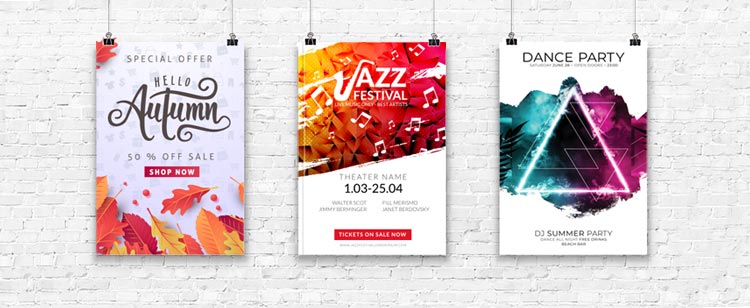
- Write a design-aware prompt. This is where Craft differs. Because the model plans the layout first, prompts that describe structure work best: “a square Instagram post for a coffee shop’s autumn sale, headline ‘Hello Autumn’ in script font top-center, 50% off badge bottom-right, warm orange palette.” Describe the layout, the text, and the hierarchy — not just the vibe.
- Pick your aspect ratio. With 30+ ratios supported natively, choose the format for the job (story, post, presentation slide, banner) before generating rather than cropping after.
- Generate, then refine by element. Review the layout the planner produced. Need different headline text or a swapped element? Use targeted editing or Magic Layers to adjust pieces individually instead of re-rolling the whole image.
- Turn it into a layered design. Send the generation through Canva’s image-to-design flow so the flat picture becomes editable layers — then apply your Brand Kit, swap in your fonts, and export.
A prompt tip worth remembering: the planner stage reads your words literally, so be explicit about text. Put headlines in quotation marks in your prompt, specify the language, and say where on the layout each text element belongs. That is the input the model was designed around.

Who Is Canva Craft Best For?
Canva Craft is not for everyone, and that is fine — it knows what it is. The people who will get the most out of it:
- Small business owners and solopreneurs who make their own marketing graphics. If you run an Etsy shop, a local service business, or a personal brand, Craft’s text-in-image reliability plus Canva’s templates may replace a freelancer for routine social posts and flyers.
- Social media managers producing high volumes of posts across formats. Thirty-plus aspect ratios with native layout planning means fewer awkward crops and faster multi-format output — and Magic Resize already exists downstream for the rest.
- Marketing teams that need brand-consistent AI imagery. Craft plus Canva’s Brand Kits is the combo pitch: AI that generates, then a kit that keeps it on-brand. For teams already on Canva Business, this is a natural extension rather than a new tool to learn.
- Developers building design features into apps. The public API (plus the coming Craft-fast/Craft-ultrafast tiers and MCP integrations for ChatGPT and Gemini) gives builders a design-specialized image endpoint to call instead of a generalist one.
- Ad creatives and ecommerce sellers generating ad variants at volume. The “ads that learn” wave — tools like Cuttable’s AI ad platform predicting which ads to build from your own performance data — pairs naturally with a design-native generator. See our Cuttable AI ad generator breakdown for that side of the workflow.

Who should look elsewhere? Professional photographers and retouchers who need pixel-perfect photorealism (OpenAI’s models or dedicated tools still lead), Illustrator/Figma-native designers who need true vector files (Ideogram Vector 1.0), and developers who need the lowest possible per-image API cost (Meta Muse Image at a penny, or open-weights models like Qwen-Image-2.1-Turbo for self-hosting).
Limitations and Honest Caveats
No launch is the whole story. Here is what to keep in mind before betting a workflow on Canva Craft:
- Photorealism lags the leaders. Early coverage notes that Craft’s complex-scene photorealism trails models like DALL-E 3 and Midjourney. It is a design model first — for graphic compositions, marketing collateral, and social assets, that is a feature; for photographic work, it is a limit.
- Benchmarks are company-reported. The DesignArena #4 debut and the “second-best AI lab” claim come from Canva. Independent, third-party testing has not confirmed them yet. Treat the numbers as a strong signal, not a verdict.
- No API pricing yet. Developers cannot yet budget for Craft at scale. Until Canva publishes per-image or per-edit rates, the cost story is incomplete.
- Some features are roadmap, not reality. Craft-fast, Craft-ultrafast, reference-image input, and the ChatGPT/Gemini MCP integrations are announced — not shipped. Build your plans around what exists today.
- Training-data bias toward templates. Learning from human-made templates gives Craft a strong design sense, but it may also inherit template sameness — the risk of outputs that look like refined Canva templates rather than original art. Watch whether heavy users start seeing a “Craft look.”
- Availability tiers are rolling out. While Craft is open to all users from Dream Lab, Canva is rolling features out gradually across plan tiers — if something announced is not visible in your account yet, check again after an update.
Why Canva Built Its Own Model
The strategy story is as interesting as the technology. Canva is used by more than a quarter of a billion people — a distribution base most AI labs would pay dearly for. Until now, it paid the other direction: licensing image models from startups and labs, most visibly Leonardo.ai’s Phoenix. Every generation a user made ran on someone else’s weights, with the margin, the roadmap, and the quality ceiling controlled elsewhere.
Building Craft in-house — with a 160-plus-person research team assembled from acquired startups — flips that. Canva now owns its model stack the way Apple owns its chips: tighter quality control, lower per-unit cost over time (Canva itself says the cheaper Craft-fast variants will reduce its own API costs), and a moat that no template library alone could provide. The timing matters too. October 2026 has been the busiest month of the year for AI image launches — Ideogram Vector 1.0 the same day, Krea 3 a week earlier, Meta’s Muse Image pricing the floor — and Canva clearly decided it would rather lead the design-model lane than rent a seat in it.
For users, the practical meaning is simpler: the AI features inside the editor where you already work are about to get a lot more capable, and they will be designed — literally — for the job you are doing. That is what Canva Craft is: not the best AI image model in the world, but the first one built specifically for the world’s biggest design audience.
Frequently Asked Questions
What is Canva Craft?
Canva Craft is Canva’s first in-house AI image generation model, launched October 22, 2026. It creates images from text prompts using a two-stage “plan before draw” system — a planning model drafts the layout first, then a rendering model produces the final image at up to 2K resolution.
Is Canva Craft free?
Craft is available inside Canva’s Dream Lab for all users, including free-plan users, subject to Canva’s monthly AI usage allowance. Paid plans (Pro at $18/month or $144/year in the US, Business at $25/month or $250/year per person) include larger AI allowances and full Magic Studio access. API pricing has not been announced.
How is Canva Craft different from other AI image generators?
Most image models turn a prompt straight into pixels. Canva Craft first writes a detailed layout plan — element placement, sizes, visual hierarchy, and text positioning — then renders the image from that plan. It was also trained on millions of human-made design templates rather than photographs, giving it a design-native sense of layout, and its output feeds into Canva’s Magic Layers for element-level editing.
Can Canva Craft generate readable text in images?
That is its flagship claim: legible text in 55 languages, thanks to the planning stage drafting text placement explicitly before rendering. This addresses the garbled-text problem that has plagued AI image generators for years — though independent, large-scale testing of the claim has not happened yet.
Where can I use Canva Craft?
Inside Canva’s Dream Lab (all users) and through Canva’s public API for developers. Canva says generation inside ChatGPT and Google’s Gemini via its MCP server is coming, along with faster/cheaper Craft-fast and Craft-ultrafast variants.
Is Canva Craft better than Ideogram or Midjourney?
It depends on the job. For photorealistic scenes, models like OpenAI’s GPT-Image family and Midjourney still lead. For editable vector design files, Ideogram Vector 1.0 (launched the same day) is the alternative. Canva Craft is built for the design workflow — layouts, typography, layered editing inside Canva — and that is the lane where it has a genuine edge.
Final Verdict
Canva Craft is the most interesting AI image launch of October 2026 — not because it tops a leaderboard (its numbers need independent confirmation), but because it is the first image model architected from the ground up for design rather than photography. The plan-before-draw two-stage system is a genuinely different idea with a clear payoff: readable text, deliberate layouts, and outputs that arrive as editable designs instead of flattened pixels. For Canva’s quarter-billion users — the small businesses, marketers, and creators who make most of the world’s marketing graphics — that specificity matters more than raw photorealism.
The open questions are real: no API pricing, unconfirmed benchmarks, roadmap features that have not shipped, and a training diet that may produce a recognizable “Craft look” at scale. But the direction is unmistakable. Canva has stopped renting its AI future and started building it. Watch the Craft-fast pricing when it lands — that is when we will learn whether Canva intends to compete as a model provider or keep its best tricks inside its own editor. For video creators, our best AI video generator 2026 comparison covers the other half of the creative AI stack.