
There is a new name generating serious buzz in AI imagery: FLUX 3 Image Klein. Released by Black Forest Labs as an open-weights text-to-image model, it promises something the biggest AI labs rarely offer — a powerful image generator you can download, run on your own computer, and even use commercially for free if you are a smaller business.
In this guide, we explain exactly what FLUX 3 Image Klein is, what makes it stand out, the hardware you need to run it at home, how the pricing and licensing work, and the four simplest ways to start creating with it today.

- What Is FLUX 3 Image Klein?
- Key Features of FLUX 3 Image Klein
- Pricing and Licensing
- Hardware Requirements
- 4 Ways to Use FLUX 3 Image Klein
- FLUX 3 Image Klein vs the Alternatives
- Who Should Use FLUX 3 Image Klein?
- Limitations to Keep in Mind
- Frequently Asked Questions
- Final Verdict
What Is FLUX 3 Image Klein?
FLUX 3 Image Klein is an open-weights text-to-image model from Black Forest Labs, the team behind the original FLUX family of image generators. The word klein is German for small, and the name is a promise: a compact, efficient model designed to deliver flagship-quality images without flagship-level hardware.
What makes the release remarkable is the licence. Black Forest Labs has opened the model weights with free commercial use for smaller businesses, as reported by VentureBeat. Freelancers, indie studios and startups can generate images for client work without paying per-image fees or subscriptions.
Just as important is how accessible it is. The Decoder notes that the model runs on consumer GPUs with just 8 GB of VRAM. In plain language: a mid-range gaming PC you may already own is enough to run a state-of-the-art image generator locally, privately and for free.
Key Features of FLUX 3 Image Klein
FLUX 3 Image Klein is not simply a smaller FLUX. It is tuned to punch above its weight. Here are the headline features:
- Native 4K image generation — crisp, print-ready output straight from the model.
- Strong prompt adherence — the image you describe is the image you get.
- Greatly improved text rendering — readable words inside posters, logos and memes.
- Multi-reference support — guide generations with more than one input image.
- Open weights — download, fine-tune and self-host with no API lock-in.
- Fast inference — optimised to run quickly even on modest consumer GPUs.

Native 4K Image Generation
Most open image models top out at around one megapixel and rely on a separate upscaler for larger sizes. FLUX 3 Image Klein generates natively at 4K resolution, which means finer detail, cleaner edges and images you can print or crop aggressively without them falling apart.
For creators, this removes a whole step from the workflow. Thumbnails, posters and wallpapers come out of the model ready to publish, and the detail holds up even when you zoom right in.
Sharper Text Rendering
Rendering legible text inside images has long been the Achilles heel of AI generators. FLUX 3 Image Klein takes a clear step forward here, producing readable signage, headlines and labels far more reliably than earlier open models.
Tip: keep on-image text short, put it in quotation marks in your prompt, and specify the exact wording. Even the best models still do better with a dozen words than a full paragraph.
Multi-Reference Image Support
Single-image editing is old news. FLUX 3 Image Klein supports multi-reference workflows, where you supply several input images — a character, a style, a scene — and the model blends them into one coherent result.
This is a big deal for consistent characters in comics, product shots in matching styles, and restyling photos while keeping the subject recognisable. It moves the model closer to a genuine photo-editing assistant than a mere random image slot machine.

Pricing and Licensing
Here is the short version: the model itself is free. You can download the weights and run FLUX 3 Image Klein without paying Black Forest Labs anything.
Commercial use is free for smaller businesses, which covers freelancers, creators and startups. Larger organisations should check the licence terms on the official release page, as the free commercial grant is aimed at smaller operations.
Your real-world costs depend on how you run it:
- Self-hosted on your own GPU: free beyond the hardware you already own. No per-image fees, ever.
- Cloud GPU rental: a small hourly fee for generation time, depending on the provider and GPU.
- Hosted APIs and apps: usage-based pricing set by each provider; convenient, but the meter is always running.
Compared with subscription generators that charge a monthly fee whether you create or not, local generation is refreshingly simple: generate a thousand images at 3am and your marginal cost is the electricity.
Hardware Requirements
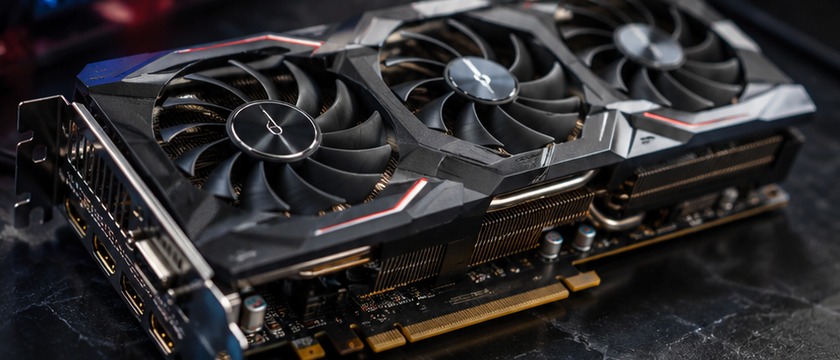
The headline number is 8 GB of VRAM. That is the minimum for running FLUX 3 Image Klein on a consumer GPU, which puts it within reach of popular mid-range cards from recent generations.
- GPU: an NVIDIA card with 8 GB of VRAM or more (12–16 GB recommended for 4K output and faster batches).
- System RAM: 16 GB minimum, 32 GB recommended.
- Storage: a fast SSD with plenty of free space for the weights and your outputs.
- Software: a current Python environment with PyTorch, or a one-click interface such as ComfyUI.
Running locally also means total privacy: your prompts and images never leave your machine. For client work under NDA, that alone can justify the setup effort.
4 Ways to Use FLUX 3 Image Klein
You do not need to be a machine-learning engineer to use this model. Pick the route that matches your hardware and your patience:
1. Run It Locally on Your Own GPU
If you have a gaming PC with 8 GB of VRAM or more, this is the best option. Install ComfyUI or a similar interface, load the FLUX 3 Image Klein weights, and generate unlimited images offline. It takes some setup, but the payoff is zero ongoing cost and complete privacy.
2. Rent a Cloud GPU
No powerful GPU? Rent one by the hour from a cloud provider. You get the same local-style workflow — full control and private generations — without buying hardware. It is ideal for weekend projects and batch jobs: spin up, generate, shut down.
3. Try It in Your Browser
The fastest way to experiment is a hosted demo or playground. Several community sites wrap open models in a simple web UI: type a prompt, get an image. You trade some control and privacy for zero setup, which is perfect for evaluating the model before committing.
4. Build With the API
Developers can integrate FLUX 3 Image Klein into apps and pipelines through inference APIs offered by hosting providers. Self-host the weights behind your own endpoint if you need predictable costs, or use a managed API to skip the DevOps entirely.

FLUX 3 Image Klein vs the Alternatives
How does it stack up? Here is a simplified view of the landscape:
- Against subscription generators (the big closed models): FLUX 3 Image Klein costs nothing per image, runs offline, and lets you inspect and modify the model. Closed rivals may still lead on raw photorealism in some niches, but you rent access and your data passes through their servers.
- Against older open models: the leap in text rendering, 4K output and prompt adherence is substantial. If your last open-source experiment was from an earlier generation, this will feel like a genuine upgrade.
- Against larger FLUX 3 variants: klein trades some maximum fidelity for speed and modest hardware requirements. If you own serious GPU hardware, the bigger siblings may suit you; for everyone else, klein is the sweet spot.
Who Should Use FLUX 3 Image Klein?
- Hobbyists and creators who want unlimited experimentation without a subscription.
- Freelancers and small studios who need commercial-use images without per-seat fees.
- Developers building image features into apps without API bills that scale with success.
- Privacy-conscious professionals working under NDAs or with sensitive material.
- Students and researchers who want open weights they can study and fine-tune.
Limitations to Keep in Mind
No model is perfect, and honest expectations matter:
- You still need a decent GPU for local use — basic integrated graphics will struggle.
- Smaller means trade-offs: at extreme detail or with very long prompts, larger models may edge it out.
- Licence limits: free commercial use is aimed at smaller businesses, so enterprises must review the terms.
- Safety filters apply: like all public releases, it ships with guardrails around disallowed content.
- A younger ecosystem: community fine-tunes and tutorials are growing fast, but older model families still have bigger libraries.
Frequently Asked Questions
Is FLUX 3 Image Klein really free?
Yes. The weights are openly available and free to download and run. Commercial use is free for smaller businesses; check the licence if you are a larger organisation.
What GPU do I need to run it?
A consumer NVIDIA GPU with at least 8 GB of VRAM. More VRAM means faster generation and smoother 4K output.
Can I use the images commercially?
Smaller businesses can, under the release licence. As always with client work, keep a copy of the licence terms for your records.
Does it work on a Mac?
Apple Silicon Macs can run many open image models through compatible frameworks, though performance varies. Check community guides for the current state of support.
How is it different from the original FLUX.1?
FLUX 3 Image Klein is a newer, smaller and more efficient generation with native 4K output, better text rendering and multi-reference support — designed to run on hardware the original could never touch.
Final Verdict
FLUX 3 Image Klein is the open image model many people have been waiting for: genuinely capable, honest about its hardware needs, and free for the small businesses and creators who benefit most. It will not replace every paid tool overnight, but it resets expectations of what free can look like in 2026.
If you are exploring the wider AI landscape, you may also enjoy our guides to Meta Muse Spark, Claude Haiku 5 and Meta Muse Wonder — three more releases shaping how we create with AI this year.
Download the weights, fire up your GPU, and start generating. Your next project might not need a subscription after all.