
Meta Muse Spaces Explained: Talk, Build and Remember — What Meta’s November Update Really Changes
Meta Muse Spaces turn a single sentence into a small custom app that lives inside Meta’s Muse assistant. Describe what you need — a holiday gift tracker, a school dashboard, an order tracker for your small business — and Muse builds it for you, then keeps it up to date from the apps you connect.
Spaces arrived on 6 November 2026, one day after Muse gained real-time voice conversations with an expressive avatar, and on the same day Meta rolled out smarter models with Active Memory and Active Focus underneath the whole assistant. Taken together, the three changes turn Muse from a chatbot you type at into something closer to a personal agent that talks, builds and remembers.
This guide explains what Meta Muse Spaces actually are, how to create one, what they can and cannot do yet, how much Muse costs, and where each new feature is available. Every claim about availability and performance comes from Meta’s own announcements or the coverage that checked them, and where Meta’s numbers are its own — the 2.4x memory improvement, the 67% focus improvement — this article says so plainly.
Table of Contents
- What Meta Announced in 48 Hours
- What Are Meta Muse Spaces?
- Nine Spaces Meta Suggests You Build First
- How to Create a Space in Muse
- How Meta Muse Spaces Stay Current
- Muse Voice: Talk Instead of Type
- Active Memory and Active Focus: The Model Underneath
- What the 2.4x and 67% Numbers Really Mean
- Meta Muse Spaces Pricing: What It Costs
- Where Muse Is Available — and Where Voice Isn’t
- Meta Muse Spaces vs ChatGPT, Gemini and Claude
- What Still Isn’t Here
- Who Should Try Meta Muse Spaces First
- Frequently Asked Questions
- The Bottom Line

What Meta Announced in 48 Hours
Meta shipped three Muse updates in two days, and the speed matters because it shows how fast the company’s personal agent is changing. Muse itself is only two months old as a consumer product — it launched in the United States on 8 September 2026, and reached its fifth country, Mexico, on 5 November, the same day voice arrived.
On 5 November 2026, Meta rolled out real-time voice conversations in the Muse app, with an expressive animated avatar and hundreds of voices to choose from. You tap the phone icon, start talking, and can interrupt mid-sentence. Voice launched in the US first, on mobile, web and Mac.
On 6 November 2026, Meta launched Spaces in a Newsroom post titled “Design the Muse App, Just for You”. A space is, in Meta’s words, “a custom experience you create inside Muse by describing your idea”. Spaces are available everywhere Muse is available, starting the same day. The same post announced that Meta is rolling out specialised versions of its models to Muse and Meta AI, trained with learnings from Muse Wonder, its most capable model series, which launched on 12 October 2026. Those specialised models carry two traits Meta names Active Memory and Active Focus.
The combination is the story. Voice changes how you talk to Muse. Spaces change what Muse can build for you. Active Memory and Active Focus change how well the assistant underneath remembers what matters and keeps going when a task hits a snag. None of the three is a new model launch on its own — there is no new model card, no parameter count and no API here — but together they move Muse from answering questions toward doing ongoing work for you.
What Are Meta Muse Spaces?
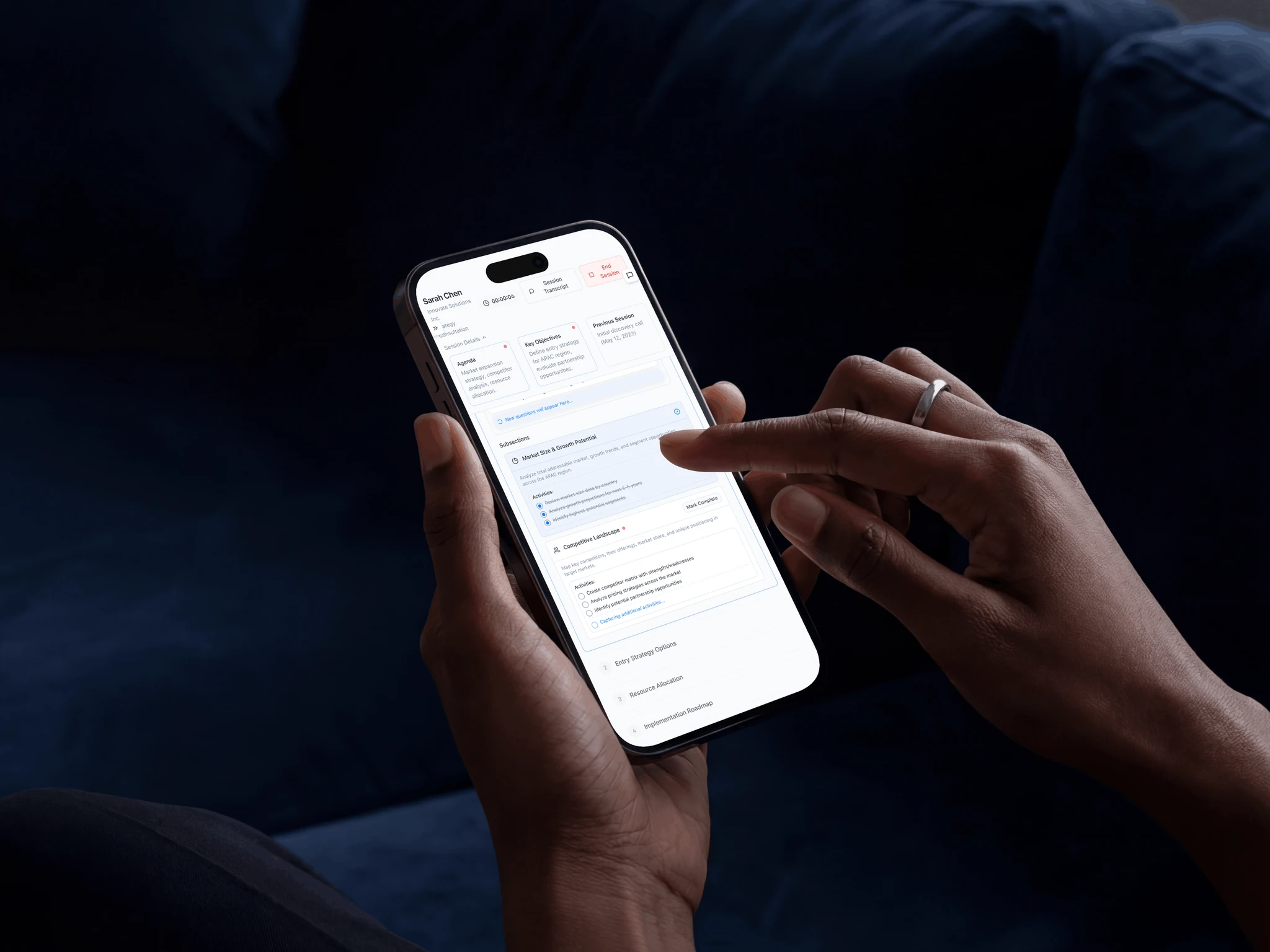
Meta Muse Spaces are custom screens you create inside the Muse app by describing an idea in plain language. You do not write code, pick a template or drag widgets into place. You tell Muse what you need in a chat message, and it builds the space for you — a tracker, a planner, a dashboard, a small game — and places it in your sidebar or main tabs so you can return to it whenever you like.
The difference from an ordinary chat is persistence. A chat scrolls away; a space stays. Meta’s pitch is that a space is a living surface: it sits in the app, you open it when you need it, and it reflects the latest state of whatever it tracks. A holiday gift tracker shows who you have bought for and what is still missing. A school dashboard shows the week’s schedule. A small-business order tracker shows new orders, customer messages and what needs to ship today.
Meta Muse Spaces are also personal in a way a shared document is not. Right now a space belongs to you alone. Meta says it is exploring ways to let you share spaces with other people and build a more collaborative experience, but sharing is not part of the launch. If you were hoping to build a family holiday planner that everyone can edit, that is not possible yet.
There is no separate download and no separate price for Spaces. They live inside the Muse app, which is free with a usage limit, with paid plans for heavier use. Meta announced no Spaces fee, and none has appeared in any source checked since the launch.
Nine Spaces Meta Suggests You Build First
Meta’s announcement lists nine example spaces. Seven are personal; two are built for small-business and freelance work. The list is worth reading in full, because it shows what Meta thinks Spaces are for — everyday organisation, not software development.
| Space | What it does | Who it suits |
|---|---|---|
| Holiday gift tracker | Tracks who you are buying for, what you have bought and what is still missing | Anyone planning Christmas shopping |
| Daily word game | A small game you return to each day | Casual players |
| DIY planning board | Plans a do-it-yourself project step by step | Home improvers |
| School dashboard | Keeps classes, homework and the week’s schedule in one place | Students and parents |
| Wedding planner | Organises guests, tasks and deadlines for a wedding | Couples planning a wedding |
| Planning board | A general board for any project you are organising | Anyone with a project |
| Daily planner | Your day, laid out and kept current | Busy professionals |
| Small-business order tracker | New orders, customer messages and what needs to ship today | Small-business owners |
| Freelance client hub | Projects, deadlines and invoices for client work | Freelancers |
The two business examples are the most interesting, because they show Meta pitching Spaces as a working tool rather than a novelty. An order tracker that knows about new orders and customer messages is only useful if it actually connects to the places those orders and messages live — which brings us to how Spaces stay current.

How to Create a Space in Muse
Meta describes the process in one line: describe your idea and Muse builds it. In practice, creating a Meta Muse Spaces entry follows the same pattern as asking Muse anything else, with a few habits that make the result better.
- Open Muse and start a chat. Spaces live inside the Muse app on mobile, web and Mac. The iPhone app, version 14.3, released on 6 November, describes Spaces in its App Store release notes, which confirms the feature on iOS.
- Describe what you want in plain language. Name the thing you want to track and what it should show. “Build me a holiday gift tracker that lists each person, their gift idea, whether I have bought it, and the budget” will produce something far more useful than “make a gift tracker”.
- Refine it in conversation. If the first version is missing a column or shows the wrong detail, say so in the same chat. The conversational build is the point: you describe, Muse builds, you correct, Muse adjusts.
- Pin it where you will find it. Spaces sit in the sidebar or the main tabs of the app. Pin the ones you use daily so they are one tap away instead of buried in chat history.
- Connect the apps it should read from. A tracker that only holds what you typed is a static list. Connect the relevant apps — your calendar, your email, your notes — and the space can refresh itself. The Verge lists Gmail, Google Calendar, OpenTable and Notion among the apps Spaces can pull from.
One caution is worth stating before you build anything ambitious. At least one outlet noted that it had not confirmed Spaces actually appearing on every account yet, even though Meta’s announcement says “starting today”. If you open Muse and do not see Spaces, check that your app is updated to the latest version, and remember that Meta rolls features out gradually — “available everywhere Muse is available” does not always mean “on your phone this morning”.
How Meta Muse Spaces Stay Current
A space that never updates is just a nicely formatted list. Meta says Spaces keep themselves up to date in the background from the apps you connect, and can be scheduled to appear at certain times. The connected-apps detail is what separates Spaces from a note-taking template.
According to The Verge’s coverage of the launch, Spaces can pull updates from connected third-party apps including Gmail, Google Calendar, OpenTable and Notion. In practice that means a school dashboard could reflect a calendar change, an order tracker could reflect a new customer email, and a planning board could reflect a note you just saved.
Meta itself has not published a full list of supported connections, and it has not said how often spaces refresh, whether they can act on their own, or whether outside connectors can feed them. Those are open questions, and the honest answer for now is that the refresh behaviour is Meta’s to clarify.
What is clear is the direction. Meta is pitching Spaces as the place where your assistant’s knowledge of your life becomes visible and organised — not a chat transcript you have to search, but a surface that shows the current state of the things you care about. That is also why the memory upgrade matters: a space is only as good as the assistant’s understanding of what matters to you, and that understanding is what Active Memory is meant to improve.

Muse Voice: Talk Instead of Type
The day before Spaces launched, Meta rolled out real-time voice conversations in the Muse app. Tap the phone icon and you can talk to Muse the way you would talk to a person on a call — including interrupting mid-sentence, which is the detail that makes a voice assistant feel like a conversation instead of a voice-operated search box.
Voice comes with an expressive animated avatar. You can talk with voice only, with the avatar alongside, or with the avatar full screen. Meta offers hundreds of voices, so the assistant does not have to sound like the same default voice everyone else hears. Meta pitches voice for brainstorming out loud, planning a trip while you walk, and rehearsing a job interview or a presentation before the real thing — the kinds of tasks where speaking is faster and more natural than typing.
Voice is the feature with the tightest availability. It is rolling out in the US first, in the Muse app on mobile, web and Mac. Meta has not said when voice reaches users outside the US, and as of 13 November no expansion had been announced. Voice conversations on Meta’s AI Glasses and on the forthcoming Muse Charm wearable are “coming soon”, with no date attached. If you are outside the US, Spaces are the part of this update you can use today; voice is the part you wait for.
Meta Muse Spaces vs Voice: Two Different Upgrades
It is easy to blur Spaces and voice into one launch, but they solve different problems. Voice changes the input: you speak instead of type, and the assistant responds in real time with an avatar. Meta Muse Spaces change the output: instead of an answer that scrolls away, you get a custom screen you return to.
Voice is about the moment of the conversation; Spaces are about what remains after it. The two work together — you could describe a space out loud while walking, then open it later on your laptop — but neither depends on the other, and their availability does not match: Spaces are everywhere Muse is, while voice is US-only for now.

Active Memory and Active Focus: The Model Underneath
On the same day Spaces launched, Meta changed the model behind Muse. Meta AI Research says Muse and Meta AI now run on “specialised versions of our existing models, trained using Muse Wonder”, the most capable model series Meta introduced on 12 October 2026. Two of Wonder’s traits come along with them.
Active Memory is Meta’s name for the model’s ability to remember what matters about you and recognise when old information becomes relevant again. Meta says it trained the models “to recognise what type of information is temporary versus permanent, to reason across time, and to distinguish between what is still relevant and what has become stale”. In practical terms, that means Muse should remember a permanent preference — your dietary requirements, your child’s school, the way you like a report formatted — while letting go of a one-off detail from three weeks ago, and it should bring the old detail back when a new conversation makes it relevant.
Active Focus is the companion trait: it keeps Muse working toward a goal when something unexpected gets in the way. Meta says it “enables Muse to continue working toward a goal, even when faced with unexpected challenges”. Instead of stopping at the first obstacle, the assistant is meant to try another approach, ask a clarifying question, or adapt to new information — and to check in before taking an important action.
Both traits matter for Spaces. A space is a standing commitment: it represents something you care about over days and weeks, not a single question. Active Memory is what lets the assistant behind the space remember why you built it and what matters inside it. Active Focus is what lets it keep the space useful when the underlying facts change — a rescheduled class, a delayed order, a gift that is suddenly out of stock.
There is an important limit to what changed. Meta has not shipped a new flagship model to consumers here. Muse Wonder and Muse Wonder Full, the models announced on 12 October, power experiences in Muse first for subscribers, and the November update brings specialised smaller models trained with Wonder’s learnings to the wider Muse app and Meta AI. There is no new model card, no parameter count and no API launch attached to this change.
What the 2.4x and 67% Numbers Really Mean
Meta reported two headline figures with this update, and both need the same careful reading: they are Meta’s own numbers, measured on Meta’s own tests, with no independent validation published so far.
For Active Memory, Meta reports a 2.4x reduction in forgetting critical information necessary for helping you achieve your goals. In plain language, Meta’s tests say the new models are roughly two and a half times less likely to drop an important detail than the models they replace. That is a meaningful claim if it holds up in everyday use — forgetting is the failure mode that makes people stop trusting an assistant with anything important — but it is a laboratory figure, not a guarantee about your conversations.
For Active Focus, Meta reports a 67% improvement in completing everyday tasks where unexpected issues arise. Again, the number comes from Meta’s own evaluation: tasks where something went wrong, and the assistant either recovered or did not. A two-thirds improvement in recovery is exactly the kind of gain that would make an agent feel more reliable — if it survives contact with real users, real calendars and real third-party apps.
Meta also says Muse now scores 47% on its Personal Superintelligence Index, up from 38%. The index is Meta’s own benchmark, so the nine-point rise tells you more about Meta’s internal direction of travel than about how Muse compares with a rival. Treat all three numbers as a statement of intent — Meta is investing in memory and persistence — rather than as settled facts about performance.
One gap is worth flagging clearly. As of the launch, Meta had not published details of the memory controls: what Active Memory stores, how long it keeps it, and how you review or delete it. For an assistant that is explicitly designed to remember more about you, that is a real omission.
If you are cautious about an AI remembering your life, watch for Meta’s memory controls before you hand Muse your calendar and inbox. The site has covered Meta’s privacy record before, and the questions raised by that coverage apply here too — read our Meta Muse privacy leak explainer for the context.
Meta Muse Spaces Pricing: What It Costs
There is no price for Meta Muse Spaces as a separate feature. Spaces come with the Muse app, which is free with a usage limit. Paid plans exist for heavier use, and the same plans govern the rest of Muse.
| Plan | Price | What you get |
|---|---|---|
| Free | $0 | Muse with a usage limit, including Spaces |
| Power | $20 per month | More weekly tokens and heavier use |
| Maximum | $100 per month | The highest usage allowance |
Meta announced no Spaces fee, and no Spaces fee exists in any source checked since the launch. The pricing question that matters is therefore not “what do Spaces cost” but “how much Muse use does your Space habit need”. A gift tracker you check twice a week will live comfortably inside the free tier. A small-business order tracker that refreshes from Gmail and Notion all day, plus voice conversations and heavy daily use, is the kind of workload the paid plans are built for.
For context, the pricing sits in the familiar band for consumer AI assistants: $20 a month is the standard price for a premium tier from ChatGPT, Claude and Gemini, and $100 a month is the power-user tier that all three now offer. Meta is not undercutting anyone here; it is matching the market and competing on the features — Spaces, voice and memory — rather than on price.
Where Muse Is Available — and Where Voice Isn’t
Availability is where this update gets confusing, because each piece has a different footprint. Here is the picture as of mid-November 2026.
- Muse app: live in five countries — the United States, Canada, Japan, Singapore and Mexico. Mexico joined on 5 November 2026, the day voice launched in the US.
- Meta Muse Spaces: available everywhere Muse is available, starting 6 November 2026. If you can use Muse, you can use Spaces.
- Muse Voice and expressive avatars: rolling out in the US first, on mobile, web and Mac. No date has been given for other countries.
- Voice on Meta AI Glasses and Muse Charm: coming soon, with no date.
- Sharing a space with other people: not available. Meta says it is exploring collaboration.
- Active Memory and Active Focus: rolling out to Muse and Meta AI. Meta has not specified which plans get the specialised models first, though it said Muse Wonder rolls out first to subscribers.
For readers in the US, the whole update is usable today, subject to the gradual rollout. For readers in Canada, Japan, Singapore and Mexico, Spaces and the memory improvements are the usable part; voice is still to come. For everyone else, Muse itself has not arrived yet — and there is no announced date for that either.
Meta Muse Spaces vs ChatGPT, Gemini and Claude
Spaces do not exist in a vacuum. Every major assistant is racing toward the same idea — an AI that does not just answer, but builds and remembers — and the comparison shows what is genuinely new about Meta’s approach and what is catch-up.
| Feature | Meta Muse Spaces | ChatGPT | Gemini | Claude |
|---|---|---|---|---|
| Build a custom app from a sentence | Yes — Spaces, launched 6 Nov 2026 | Apps and GPTs, but building is a separate flow | Gems and Canvas, more document-oriented | Artefacts, more code-and-document oriented |
| Real-time voice with avatar | Yes — US only, from 5 Nov 2026 | Yes — Advanced Voice Mode, widely available | Yes — Gemini Live, widely available | Voice is newer and narrower |
| Memory that distinguishes permanent from temporary | Active Memory, from 6 Nov 2026 | Memory across chats, with controls | Memory with explicit saved info | Memory features in projects and recent launches |
| Connected apps feeding a live surface | Gmail, Calendar, OpenTable, Notion per The Verge | Extensive connectors and apps | Deep Google Workspace integration | Growing connector set |
| Share what you built | Not yet — being explored | Yes — shareable GPTs and links | Yes — shareable Gems and Canvas | Yes — shareable artefacts |
| Free tier | Yes, with a usage limit | Yes, with limits | Yes, with limits | Yes, with limits |
The honest verdict is that Meta is not first to any single piece of this. ChatGPT’s voice mode and Gemini Live were both widely available before Muse Voice arrived, and shareable custom GPTs predate Spaces by years.
What is new is the combination inside one consumer app that is free to start: a space you describe in words, that stays in your sidebar, that refreshes from your real apps, backed by a model that is explicitly trained to remember what matters and persist through problems. Meta’s bet is that the package — not any one feature — is what makes an assistant feel personal.
The comparison also shows Meta’s weak spots plainly. Voice is US-only while its rivals’ voice features are widely available. Sharing does not exist while rivals let you share what you built. And the memory controls — what is stored, for how long, and how you delete it — were unpublished at launch, while ChatGPT and Gemini both document theirs.
If you already live in Google Workspace, Gemini’s integration is deeper today. If you want to share a tracker with your family or your team, ChatGPT or Claude will do it and Muse will not, yet.
For the site’s wider coverage of the models behind these assistants, see our Meta Muse Wonder explainer and our Meta Muse Spark Open explainer, which cover the model family Spaces are built on.
What Still Isn’t Here
A launch announcement is a promise as much as a delivery, and this one has a long list of things that are not here yet. Keeping them in one place matters, because the gap between “announced” and “available” is where readers get disappointed.
- Sharing spaces. You cannot share a space with another person, and Meta has given no date. A wedding planner you cannot share with your partner is a real limitation.
- Voice outside the US. No date for Canada, Japan, Singapore, Mexico or anywhere else.
- Voice on glasses and Muse Charm. “Coming soon” with no date, even though voice on glasses was previewed at Connect 2026 in September.
- Memory controls. What Active Memory stores, how long it keeps it, and how you review or delete it were unpublished at launch.
- Refresh behaviour. Meta has not said how often spaces refresh, whether they can act on their own, or whether outside connectors can feed them.
- Model details. No names, benchmarks or prices for the specialised models trained with Muse Wonder learnings — only the two traits and the two headline figures.
- Independent verification. The 2.4x and 67% figures are Meta’s own, with no outside replication published so far.
None of these is a reason to dismiss the update. Every assistant launch ships with gaps. But if you are choosing between Muse and a rival today, the gaps are the decision: pick Muse for the package of Spaces, voice and memory if you are in the US and work alone; pick a rival if you need to share, need voice outside the US, or need documented memory controls now.
Who Should Try Meta Muse Spaces First
Small-business owners and freelancers get the most from Spaces today. The order tracker and the client hub are the two examples Meta chose to highlight for work, and they map directly onto real pain: orders, messages, deadlines and invoices scattered across apps. If your business runs on Gmail and Google Calendar, a space that pulls those together is worth an afternoon of experimenting.
People planning a big event — a wedding, a holiday, a house move — are the second-best fit. These are exactly the projects where a chat transcript fails: too many details, spread over too many weeks, with too many people and dates. A space that holds the plan in one place, and stays current, is the use case Meta designed for.
Students and parents will find the school dashboard useful, especially where a family already uses Google Calendar for the week’s schedule. It is a small, concrete win rather than a transformation — but small concrete wins are how an assistant earns daily use.
Voice-first users in the US should try Muse Voice for the tasks Meta pitches: brainstorming out loud, rehearsing a presentation, planning while walking. The interrupt-mid-sentence detail is genuinely important — a voice assistant you cannot interrupt is a lecture, not a conversation.
Everyone else should wait and watch. If you are outside the US, if you need to share a tracker with other people, or if you want clear memory controls before an AI remembers your life, the right move is to let the rollout mature and check back. The features are real, but the rough edges are real too.
Frequently Asked Questions
What are Meta Muse Spaces?
Meta Muse Spaces are custom mini-apps you create inside the Muse app by describing an idea in plain language — a gift tracker, a school dashboard, an order tracker for your small business. Muse builds the space and keeps it in your sidebar or tabs, updating it from the apps you connect.
When did Meta Muse Spaces launch?
Meta launched Spaces on 6 November 2026, in a Newsroom post titled “Design the Muse App, Just for You”. They are available everywhere Muse is available, starting the same day. Muse Voice rolled out the day before, on 5 November, in the US.
How much do Meta Muse Spaces cost?
Spaces have no separate price. They come with the Muse app, which is free with a usage limit. Paid plans are Power at $20 per month and Maximum at $100 per month, for heavier use.
Can I share a Meta Muse Space with someone else?
Not yet. Spaces are personal for now. Meta says it is exploring ways to let you share spaces with others and build a more collaborative experience, but sharing is not part of the launch and no date has been given.
Is Muse Voice available outside the US?
No. Voice conversations with expressive avatars are rolling out in the US first, on mobile, web and Mac. Meta has not said when voice reaches users in other countries. Spaces, by contrast, are available everywhere Muse is available.
What is Active Memory in Muse?
Active Memory is one of two traits from Meta’s Muse Wonder model series now rolling out in specialised models behind Muse. Meta says it trains the models to recognise what type of information is temporary versus permanent, reason across time, and bring old information back when it becomes relevant. Meta reports a 2.4x reduction in forgetting critical information — its own figure, not independently verified.
Which apps can Meta Muse Spaces connect to?
The Verge lists Gmail, Google Calendar, OpenTable and Notion among the apps Spaces can pull updates from. Meta has not published a full list of supported connections, and has not said how often spaces refresh.
Do Meta Muse Spaces work on Mac and the web?
Spaces live inside the Muse app, and Meta says they are available everywhere Muse is available. Voice is confirmed on mobile, web and Mac in the US. The iPhone app version 14.3, released 6 November, describes Spaces in its release notes. Meta has not confirmed Spaces separately on Mac, on the web, or on Android.
The Bottom Line
Meta Muse Spaces are the most useful part of Meta’s November update, and the easiest to understand: describe what you need, get a small app that lives in your assistant and stays current.
Voice is the most fun part, and the most limited — US-only, with glasses and the Muse Charm wearable still waiting. Active Memory and Active Focus are the most important part in the long run, because an assistant that remembers what matters and keeps going when things go wrong is the difference between a chatbot and a personal agent — but their headline numbers are Meta’s own, and the memory controls were unpublished at launch.
The update does not make Muse the best assistant on every measure. ChatGPT and Gemini still have wider voice availability, deeper sharing and documented memory controls.
What it does is make Muse a credible choice for a specific person: someone in the US, working mostly alone, who wants their assistant to talk, to build them small tools, and to remember what matters. If that is you, open Muse, describe a tracker you actually need, and see whether the space it builds earns a place in your sidebar. If it does, Meta’s bet has paid off. If it does not, the space will tell you — by going stale, by missing the detail that mattered, or by sitting unused — and that is useful information too.
Sources: Meta Newsroom, “Design the Muse App, Just for You”, 6 November 2026 (about.fb.com); Meta AI Research on specialised models trained with Muse Wonder learnings; The Verge coverage of Muse Spaces and connected apps. All performance figures are Meta’s own and are labelled as such in the article.